
Hardware Specifications
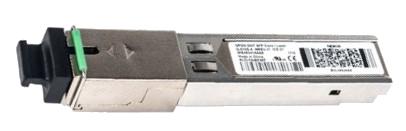
| Vendor/Brand | Nokia |
| Model | G-010S-A |
| ODM | ✅[1] |
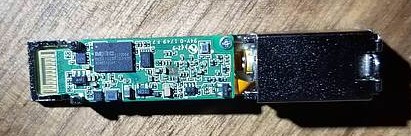
| Chipset | Lantiq PEB98035 |
| Flash | 16 MB |
| RAM | 64 MB |
| CPU | MIPS 34Kc interAptiv |
| CPU Clock | 400MHz |
| System | OpenWRT |
| HSGMII | Yes |
| Optics | SC/UPC |
| IP address | 192.168.1.10 |
| Web Gui | ✅ user adminadmin, password ALC#FGU |
| SSH | ✅ user ONTUSER, password SUGAR2A041 |
| Telnet | |
| Serial | ✅ on SFP |
| Serial baud | 115200 |
| Serial encoding | 8-N-1 |
| Form Factor | miniONT SFP |
Modifying firmware
The Nokia G-010S-A can be flashed with the Nokia G-010S-P firmware, provided the MTD layout has been changed beforehand to match the new one. For the full procedure, see this post on lafibre.info
List of software versions
Serial
The stick has a TTL 3.3v UART console (configured as 115200 8-N-1) that can be accessed from the SFP connector.
| USB TTL(UART) Adapter | SFP 20pins Molex connector |
|---|---|
| 3.3V | pin #15 and #16 |
| TX | pin #3 |
| RX | pin #6 |
| GND | pin #14 and #10 |
Note
Try PIN 10 or other GND PINs if the connection doesn't work by using PIN 14.
Note
Some USB TTL adapters label TX and RX pins the other way around: try to swap them if the connection doesn't work.
List of partitions
| dev | size | erasesize | name |
|---|---|---|---|
| mtd0 | 00040000 | 00010000 | "uboot" |
| mtd1 | 00080000 | 00010000 | "uboot_env" |
| mtd2 | 00600000 | 00010000 | "linux" |
| mtd3 | 004d81b6 | 00010000 | "rootfs" |
| mtd4 | 000b0000 | 00010000 | "rootfs_data" |
| mtd5 | 00600000 | 00010000 | "image1" |
| mtd6 | 00100000 | 00010000 | "configfs" |
| mtd7 | 00210000 | 00010000 | "logfs" |
| mtd8 | 00010000 | 00010000 | "ri" |
| mtd9 | 00010000 | 00010000 | "sfp" |
| mtd10 | 00010000 | 00010000 | "ribackup" |
List of software versions
- 3FE46398AFGA95
- 3FE46398AFGB89
- 3FE46398BFGA06
- 3FE46398BFGB18
- 3FE46398BFIB36
- 3FE46398BGCB22
- 3FE47111AFGB89
- 3FE47111BFHB32
See more info on: Firmwares G-010S-A
Usage
Enabling serial
fw_setenv bootdelay 5
fw_setenv asc0 0
fw_setenv preboot
GPON ONU status
Getting the operational status of the ONU
onu ploamsgGetting information on the OLT vendor
omci_pipe.sh meg 131 0Querying a particular OMCI ME
omci_pipe.sh meg MIB_IDX ME_INWhere MIB_IDX is the MIB ID and ME_IN is the ME instance number
Getting/Setting Speed LAN Mode
| Velue | Speed |
|---|---|
| 4 | 1 Gbps / SGMII |
| 5 | 2.5 Gbps / HSGMII with auto-neg on |
To enable the interface to sync at 2.5 Gbps speeds / using HSGMII with auto-neg on:
fw_setenv sgmii_mode 5To revert the change back to default:
fw_setenv sgmii_modeTo get the (H)SGMII Mode:
onu lanpsg 0The link_status variable tells the current speed
GPON/OMCI settings
Enabling parameter modification
This setting must be set in order to perform other parameter modifications
ritool set OperatorID 0000Getting/Setting ONU GPON Serial Number
To check the current serial number:
onu gtcsngTo set the current serial number:
ritool set MfrID ABCD
ritool set G984Serial 012345678
ritool set YPSerialNum 012345678
Getting/Setting ONU GPON PLOAM password
To check the current password (the password field contains decimal values of ASCII characters):
onu gtccgThis value can be changed using the web interface.
Getting/Setting OMCI software version (ME 7)
The software version must be changed by directly modifying firmware by using the patches found in the wiki's page about the Nokia G-010-A ONT and then adding a folder 0001_swversion that contins a file patch.sh with the following content:
#!/bin/sh

set -e

ROOTFS=$1

echo "Changing to software version desidered"
sed -i s/3FE46398BGCB22/3FE45655BOCK99/g "$ROOTFS/usr/etc/buildinfo"
Where 3FE46398BGCB22 is the current software version and 3FE45655BOCK99 the desired software version
Getting/Setting OMCI hardware version (ME 256)
ritool set HardwareVersion 3FE47211EGAA
ritool set ICS 01
Getting/Setting OMCI equipment ID (ME 257)
This ONT is designed to save Nokia's equipment ID, specifically to set the equipment ID of a Nokia G-010G-Q the following commands are to be used:
ritool set CleiCode __________
ritool set Mnemonic G-010G-Q__
Where CleiCode is the prefix and Mnemonic the postfix.
Advanced settings
Transferring files to the stick
Info
If you use a modern OpenSSH version (e.g. >= 8.8) you will have to use the legacy protocol and enable some deprecated algorithms: scp -oKexAlgorithms=+diffie-hellman-group1-sha1 -oHostKeyAlgorithms=+ssh-dss [...]
# scp rootfs.bin root@192.168.1.10:/tmp/Backup of all partition
Make a backup of all partitions, an easy way is to run these commands:
- On the stick run:
cat /proc/mtd- For each mtdX run this command in the lantiq shell:
cp /dev/mtdX /tmpInfo
If you use a modern OpenSSH version (e.g. >= 8.8) you will have to use the legacy protocol and enable some deprecated algorithms: scp -oKexAlgorithms=+diffie-hellman-group1-sha1 -oHostKeyAlgorithms=+ssh-dss [...]
And in the computer shell:
scp ONTUSER@192.168.1.10:/tmp/mtdX ./Checking the currently active image
upgradestatusSetting management MAC
ritool set MACAddress 12:34:56:78:9A:BCSetting management IP
ifconfig eth0:1 192.168.1.10 netmask 255.255.255.0Flashing a new rootfs via SSH
Info
Only the inactive image can be flashed
Info
It is recommended to enable serial access via TTL
The following commands are used to flash a new rootfs to image1 and then boot to it:
mtd write /tmp/rootfs.bin image1
update_env_flag 1
reboot
Disabling Dying Gasp
uci set gpon.gtc.nDyingGaspEnable='0'; uci commit gponRebooting the ONU
rebootMiscellaneous commands
cat /configs/image_version
cat /usr/etc/buildinfo
ritool dump
omciMgr
Miscellaneous Links
- G-010S-A
- Usage GPON module SFP in Spain
- Bypassing the HH3K up to 2.5Gbps using a BCM57810S NIC
- Nokia G-010S-A Pin 6 Iusse - Rsaxvc.net
- Might require solder mod in order to work with BCM57810S NIC
The last model letter in a Nokia/Alcatel ONT indicates the variant: A-M ALu ONT Manufacturer, P-Z external Manufacturer https://hack-gpon.org/assets/img/ont-nokia-naming.jpg ↩︎